
I recently downloaded Google Gemini CLI to explore its integration with my Obsidian vault, hoping to add another useful tool to my arsenal. This led to a small development project that, I believe, effectively demonstrates both the strengths and weaknesses of current Large Language Models (LLMs). It also highlights the benefits of a collaborative approach; the solution we arrived at that weekend was one I might not have considered on my own, and it appears to be a robust one, though we may need to tweak it as I gain experience with the new dashboard.
Summary of the Issue I Was Trying to Resolve
As I may have mentioned in other posts, I’ve been struggling with filtering articles in my Readwise library into a manageable shortlist. The number had grown to over 200, which is simply unsustainable. To address this, I decided to explore solutions using Gemini CLI.
Gemini CLI is a command-line variant of Gemini, primarily aimed at software developers. However, as I use Obsidian and my notes are saved as plain text Markdown files, it has the potential to serve as a valuable research assistant.
The AI offered some reasonable suggestions for managing my Reader, most of which I had already considered, and it strongly advocated for being more stringent about what I shortlisted. Crucially, it also proposed a new process for managing highlighted notes fed into my vault from Obsidian, which seemed like a significant improvement over my current workflow.
The Initial Plan
Intrigued, I asked Gemini to outline a plan for implementing these changes within my vault. It suggested adding properties to the notes created by the Readwise sync and then utilising Obsidian’s Dataview community plugin.
This was a sensible suggestion, but I pushed back and proposed using Obsidian Bases, a core plugin developed by Obsidian. It’s worth noting that Bases is a relatively new plugin, which might influence future developments.
Gemini, searching the internet, found documentation on Obsidian Bases and concluded that, as it’s a core Obsidian functionality, it would be the preferred approach.
Implementation Phase
The AI began guiding me through the process of adding properties in Readwise. These properties would then be synced to Obsidian via the official Readwise plugin.
Gemini CLI then created a new note in Obsidian designed to display notes with the matching properties in the appropriate section of the dashboard. However, it didn’t work as intended. The AI attempted to debug the code, and eventually suggested checking how properties were searched using Obsidian’s search tool. I then provided feedback on what I observed.
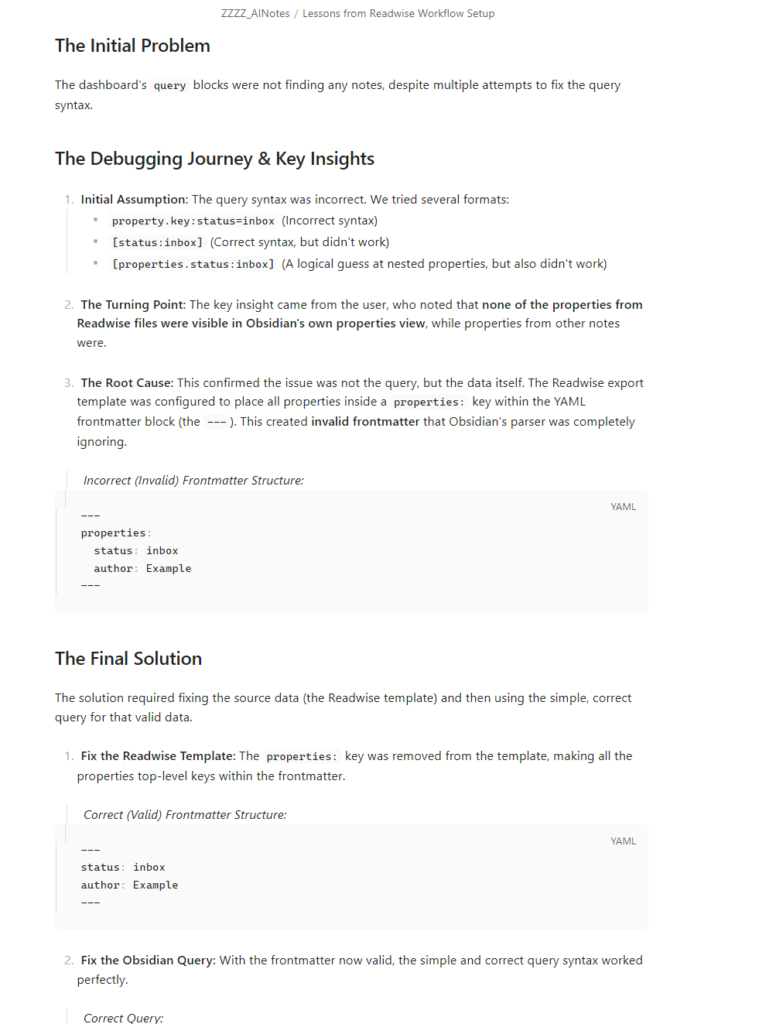
Essentially, the syntax we had set up in Readwise was incorrect. We worked on this problem with the AI for a couple of hours. I believe the underlying issue was, at least in part, due to Bases being a relatively new functionality.
Conclusion
As mentioned, Bases is a new functionality and likely differed slightly from what the Gemini model had encountered during its training. However, it demonstrated its capability to resolve the issue, even if it required my observation of Obsidian’s search functionality to pinpoint the problem.
To ensure that both I and the AI models learned from this experience, I used Google Gemini CLI to create a note based on the lessons learned. Since then, Google Gemini CLI has created a new, related dashboard, and by referencing these lessons learned, it implemented the changes without any issues.
For the latest on technology, PKM, and AI, join our weekly newsletter.
Further Reading
- From Information Overload to Knowledge Powerhouse: Building Your Personal Knowledge Management Stack: Explains my system for capturing ideas from various digital sources. https://www.ctnet.co.uk/from-information-overload-to-knowledge-powerhouse-building-your-personal-knowledge-management-stack/
- What is Markdown?: An introductory guide to Markdown. https://www.ctnet.co.uk/what-is-markdown/
- Getting Started with Obsidian Bases and Properties: An introductory guide to Obsidian Bases and parameters. https://www.ctnet.co.uk/getting-started-with-obsidian-bases-and-properties/
- CTNET Guide to Setting up Readwise and Obsidian Sync: A guide to setting up Readwise and Obsidian Sync. https://www.ctnet.co.uk/ctnet-guide-to-setting-up-readwise-and-obsidian-sync/