
In early December I wrote My Journey to an AI-Powered Research Assistant in Obsidian Pt1, in which I introduced the reader to my current Personal Knowledge Management system in Obsidian and how I was implementing AI through the use of Obsidian community plugin with Co-Pilot.
I also mentioned in passing that I had started experimenting with the Claude desktop application and Gemini CLI.
This week I will be carrying out my weekly review which I will share with you within the next couple of weeks. Before then I wanted to share my journey of using AI alongside Obsidian since my last update in My Journey to an AI-Powered Research Assistant in Obsidian Pt1.
How do I use Claude with Obsidian?
In December I decided to subscribe to one of the main underlying AI models and it was really a battle between Claude and Gemini as I preferred their free versions over ChatGPT, which I considered to be less thorough with its answers.
There were a number of criteria and I ran through those criteria with both Gemini and Claude, and one of the key factors was how well they would work with my Obsidian vault. I already had the Claude Windows application at that time and was also aware of Claude Code.
I want to share how I have been using the three different flavours of Claude since December, and one of those variations didn’t even exist when I signed up for Claude in December 2025.
Claude chat
Claude chat is what you would expect a large language model to look like. I still use it a lot to share ideas and thoughts, often triggered when I have read an interesting paragraph in a piece of content which has either really resonated with me, or contains a word or phrase I want to learn more about.
Just this week I was reading a transcript from a YouTube video by Yuval Noah Harari and the section that intrigued me was about how AI generates words, asking whether it is really any different from how we generate language. I added an observation to the prompt that it builds on Yuval’s argument that language is the human operating system. I then added my own experience of writing, that working out the flow of words aids my own thinking.
This sparked an interesting conversation which introduced me to a couple of ideas from the Russian philosopher Lev Vygotsky and his concepts of inner speech and Zone of Proximal Development (ZPD).
The concept of ZPD intrigued me as it seemed to have some similarities with Zettelkasten and the conversation I was experiencing at that time with Claude. Out of that conversation I got a fleeting note and a layout for a possible blog post from that one conversation.
For me the fleeting note is the key output as it allows me to process the ideas covered in that conversation and turn them into permanent notes in my Zettelkasten, respecting the red line in my own framework of writing my own literature and permanent notes.
Claude Code
Claude Code was the model I initially wanted to explore. I had seen a number of YouTube videos where the content creators were using Claude Code to interact with their Obsidian vault. This is due to it being hosted locally on your PC.
When I first started using the application, it could only run inside the Windows Terminal, but it has direct access to the files in my Obsidian vault. All notes created by Obsidian are stored as Markdown files which Claude Code can read, create and update.
After running the initial setup with Claude Code to help it learn about how my vault is used, I have been working with it and have started learning how to make the best use of it.
So far I have created some skills with Claude Code to:
- Create and update an alphabetical index of my Zettelkasten permanent notes.
- Suggest tags for permanent notes
- Review my daily journal at the end of each week
- Edit my blog posts
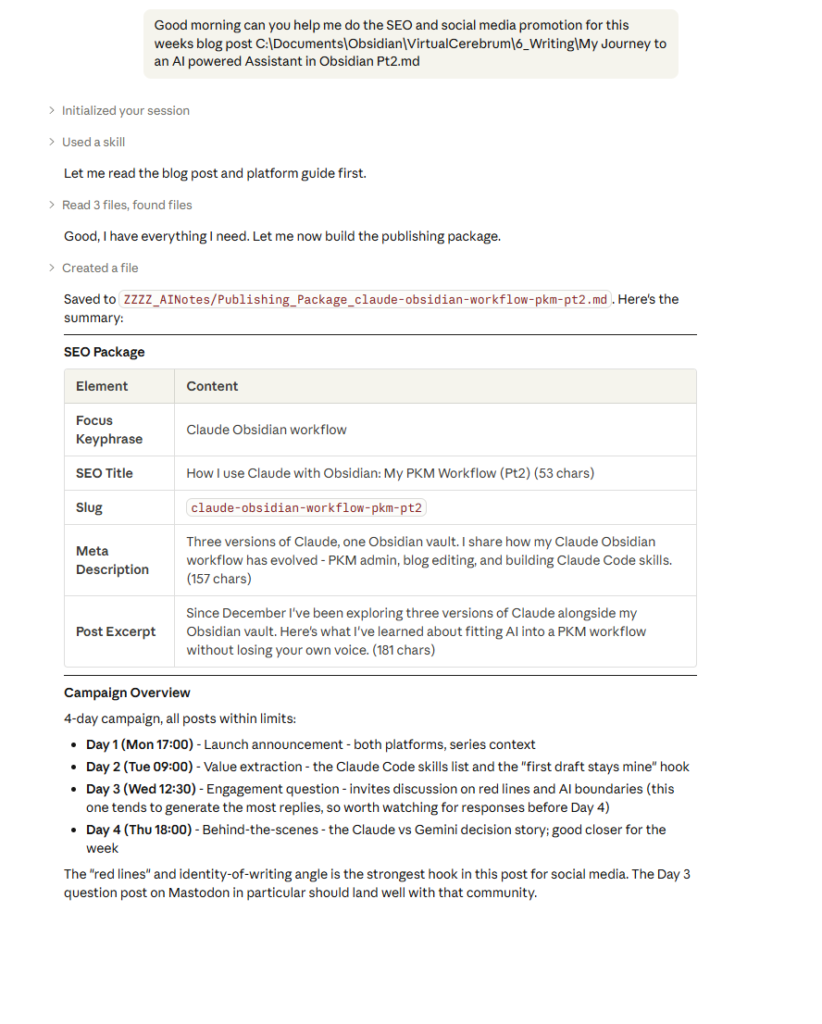
- Help me with my SEO and social media marketing when I post a new blog post
I will also be using it in a few days to run an analysis of my vault to map the edge of my understanding and suggest areas for future learning and ideas for me to explore further in my writing. I got this idea after reading an article on how Claude Code’s planning mode can be used in coding. I plan to do this quarterly as part of my quarterly review.
Claude Code has recently become available on the Windows desktop app and I have only recently started exploring the Claude Code functionality through the desktop app.
Claude Cowork
Claude Cowork is the newest way of accessing Claude and, like Claude Code, it can carry out actions. It is Claude Code aimed at non-technical users. I haven’t really used it enough to share any clear thoughts on it.
The tool is also currently in research preview, but I have included it for completeness.
Claude mobile application
Claude is also available on a mobile app which I have installed on both my mobile phone and tablet.
Part of my morning routine is to do some reading, usually of research papers or articles on my tablet, and on the occasions I find something interesting I can start a conversation with Claude chat via the mobile app. The example I used in the section on Claude chat started this way.
What makes this so useful is that I can continue the conversation on my mobile phone later during my breakfast, and if it is something useful I can pick up the chat on my desktop and ask Claude to create a new note off the back of this conversation.
How Claude fits in with my PKM
I mainly use it to help streamline some of my administrative tasks such as maintaining my A to Z index and on longer fleeting notes I will get it to summarise them.
I also like to use it to recommend tags after I have reviewed its initial suggestions and finished writing my permanent note.
How Claude has impacted my blogging process
I think this is where Claude has had the biggest impact so far, particularly on how I use AI within my processes.
From our initial conversations on something that intrigues me, such as the example I used in the Claude chat section of this post.
Through laying out most of my blog posts, it was while laying out a blog post on the impact of AI on our cognitive ability that Claude asked me if I wanted to write a single post, which started a conversation about whether I had enough material in my Zettelkasten to do so. This conversation led to a five post series on the potential risks and solutions to AI impact on our cognitive ability. The first post in this series is The AI Cognitive Ability Paradox
But I still don’t lay out every post I write. For instance, I laid out this post myself, based on my own experiences.
When I ask Claude to help me lay out the post, that’s when I’ll be writing about things I have taken notes on. Claude can go through my notes and lay out the post from those notes, often finding ideas I had forgotten. This can help to trigger fresh ideas when I write the post.
Writing the first draft remains one of my red lines, as writing is part of my identity and it’s one of my key tools for thinking.
Claude helps me to edit, and recently it made suggestions on common issues it had been finding. These get saved into a note after each blog post has been edited. Grammar is one of my weaknesses, so I want to see how I can use this feedback to learn.
Last week Claude went through the feedback document and put forward suggestions on things I should look for when I edit. The plan is to see if that helps me to reduce or even eliminate those issues.
I also use Claude to make suggestions on SEO and social media posts to promote the blog post, managed through Claude Code, and this has sped up the publishing process.
I would love to know how you use Claude alongside your PKM.