Skip to content
The Computer & Technology Network

Making technology easier

  • Home
  • CTNET Monthly Newsletter
  • Blog
  • CTNET beginners guide to the Internet
  • Plex media server Home
  • CTNET Manifesto
  • Contact Us
  • Privacy Policy
  • Cookie Policy (UK)
  • Search
Tag search in Obsidian

Introduction to managing tags in Obsidian

Application-tip / Sean Barnes / Obsidian / 16/10/2023

In this guide, we will look at what tags are and how you can use tags to help you organise your notes in Obsidian.

Introduction to managing tags in Obsidian Read More »

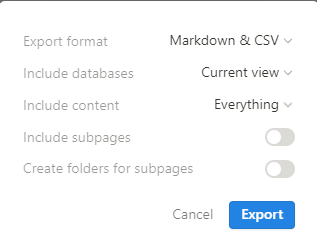
Notion export menu allows you to control how the data is exported

Exporting Notion Databases to a Spreadsheet

Application-tip / Sean Barnes / Notion / 09/10/2023

In this guide, I’ll take you through the process of exporting a Notion data table so that it can be opened in a Spreadsheet

Exporting Notion Databases to a Spreadsheet Read More »

Adding a note to a collection in Mem

Introduction to Mem collections

Application-tip / Sean Barnes / mem.ai / 02/10/2023

Collections are Mem’s equivalent to tags. This introductory guide will explore what collections do and how to use them in Mem.

Introduction to Mem collections Read More »

Google Bard answering a query

Carrying out a personal audit on how I’m using Artificial Intelligence

Artificial Intelligence / Sean Barnes / Artificial Intelligence / 25/09/2023

The best place to start any exploration of Artificial Intelligence is to consider how I currently use Artificial Intelligence.

Carrying out a personal audit on how I’m using Artificial Intelligence Read More »

Notion student templates

How to use Notion as a student

Application discussion / Sean Barnes / Notion / 19/09/2023

n this blog post, I put myself in the shoes of a student and consider how I would want to use Notion to help make the most of my studies

How to use Notion as a student Read More »

A screenshot of the Logseq workspace

How to use Logseq as a student

Application-tip / Sean Barnes / Logseq / 18/09/2023

This guide is aimed at students who have just decided to use Logseq for note-taking and want to know how to get started.

How to use Logseq as a student Read More »

Obsidian vault creation screen.

How to start using Obsidian as a student

Application-tip / Sean Barnes / Obsidian / 11/09/2023

This guide is aimed at students who have just decided to use Obsidian for note-taking and want to know how to get started.

How to start using Obsidian as a student Read More »

A Literature note in Obsidian

Five note-taking applications for students in 2023

Application discussion / Sean Barnes / Knowledge management, Logseq, mem.ai, Notion, Obsidian, TANA / 04/09/2023

A list of five applications that I have used and reviewed that a student could use to take notes for his studies and form the core of a PKM

Five note-taking applications for students in 2023 Read More »

Graph view of my Obsidian vault. Each dot represents a note or tag and lines btween dots represent a link between the note

My productivity and knowledge management system 2023

Application discussion / Sean Barnes / Knowledge management, Note taking, productivity tools / 28/08/2023

An update on the continuing evolution of my personal productivity and knowledge management systems and how I use them.

My productivity and knowledge management system 2023 Read More »

Notion select Datatype in use

2023 Guide to Notion Datatypes

Application-tip / Sean Barnes / Notion / 21/08/2023

In this guide, we will look at the Notion datatype before we look at and summarise each Datatype available in Notion.

2023 Guide to Notion Datatypes Read More »

← Previous 1 … 16 17 18 … 44 Next →

Buy Me a Coffee

  • Home
  • CTNET Monthly Newsletter
  • Blog
  • CTNET beginners guide to the Internet
  • Plex media server Home
  • CTNET Manifesto
  • Contact Us
  • Privacy Policy
  • Cookie Policy (UK)
Powered by Astra WordPress Theme
Manage Consent
To provide the best experiences, we use technologies like cookies to store and/or access device information. Consenting to these technologies will allow us to process data such as browsing behaviour or unique IDs on this site. Not consenting or withdrawing consent, may adversely affect certain features and functions.
Functional Always active
The technical storage or access is strictly necessary for the legitimate purpose of enabling the use of a specific service explicitly requested by the subscriber or user, or for the sole purpose of carrying out the transmission of a communication over an electronic communications network.
Preferences
The technical storage or access is necessary for the legitimate purpose of storing preferences that are not requested by the subscriber or user.
Statistics
The technical storage or access that is used exclusively for statistical purposes. The technical storage or access that is used exclusively for anonymous statistical purposes. Without a subpoena, voluntary compliance on the part of your Internet Service Provider, or additional records from a third party, information stored or retrieved for this purpose alone cannot usually be used to identify you.
Marketing
The technical storage or access is required to create user profiles to send advertising, or to track the user on a website or across several websites for similar marketing purposes.
  • Manage options
  • Manage services
  • Manage {vendor_count} vendors
  • Read more about these purposes
View preferences
  • {title}
  • {title}
  • {title}