
This is the fourth post in my series on how I’m using Claude with Obsidian. You can read my last update in Claude Obsidian Workflow: My PKM Update (Part 3).
In this post, I will be sharing how I use Claude to lay out future blog posts and how, on occasion, it has led me to publish a series of related posts. I’ll also share how Claude is helping me to manage my notes to synthesise. And lastly, I want to quickly cover recent changes to Obsidian Copilot.
Laying out content
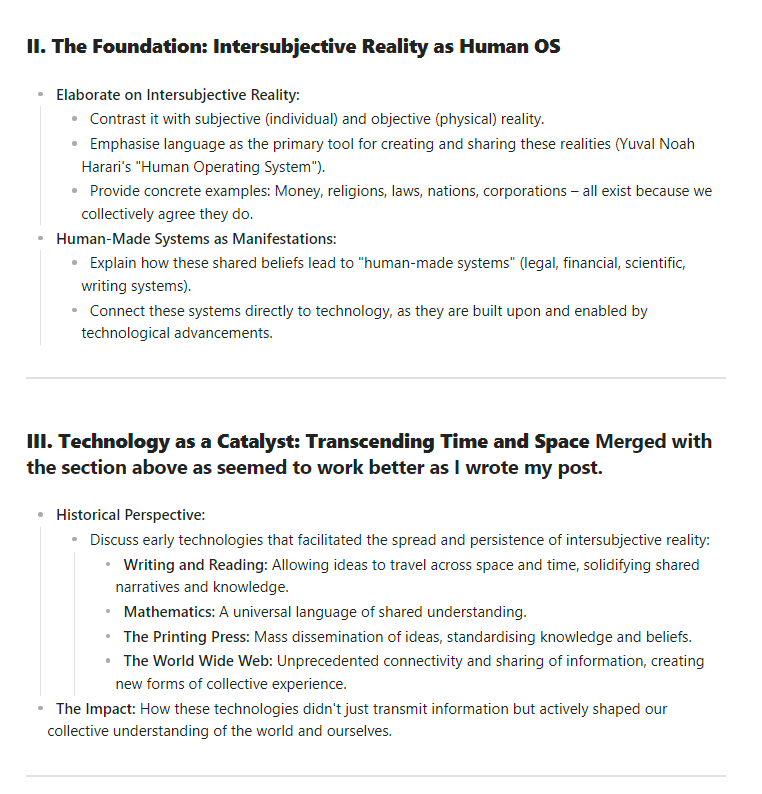
This blog post is the exception to the rule, in that I created the layout myself. A layout is a rough idea of what I aim to cover in a post. Most of the layouts I currently use are the result of collaboration between myself and Claude.
During the process, I state my aims for the post and share the post itself, which is often linked to my project note (a quick note on what those aims are).
I nearly always prompt it to scan my permanent notes and base the layout it creates on those notes. It often finds notes that I wouldn’t even have considered. That helps me with my learning and hopefully keeps my posts interesting.
Claude will likely ask some questions to help me tailor the post. During this process, I shared with Claude that I can find it difficult to write anything longer than 1,200 words, and it takes this constraint into account.
At times we break the length constraint, and on other occasions we have decided to go for a series, but this isn’t always down to just the post length. I had never thought of doing a series of posts until Claude suggested it. Examples of this include Reading Is a Technology, Not a Human Instinct and What Is the Exponential Age? Technology Explained.
It is worth noting that Claude’s word count estimates can be way off, and I think that is at least in part due to me. Sometimes I get into a section of a post and add new ideas and thoughts, while other times I don’t feel it, or think I haven’t got the right material, and it doesn’t get written.
At the end of the day, the layout’s job is to help me get started. It is a rough list of things that I might want to cover, and it exists to help me write my first draft. Writing that draft is one of my red lines, so it’s on me to decide what I write about. The layout is a helpful suggestion, so I never start from a blank page.
You can learn more about how I write in my post Using Obsidian for my writing.
Managing notes to synthesise
One of the biggest issues with keeping a PKM like a Zettelkasten is that you will always generate more fleeting notes that could be synthesised into permanent notes than you can actually process, due to a lack of time. The friction of the synthesis process is where the learning occurs, so you can’t speed it up for efficiency. It does take time. This is the real face of information overload. You can discover more about information overload in my post Understanding Information Overload.
That means your backlog of notes will always build up, so we have to manage and prioritise it. At the start of the year, I made some changes to the way I processed my fleeting notes, and that change made me realise that I couldn’t process this backlog.
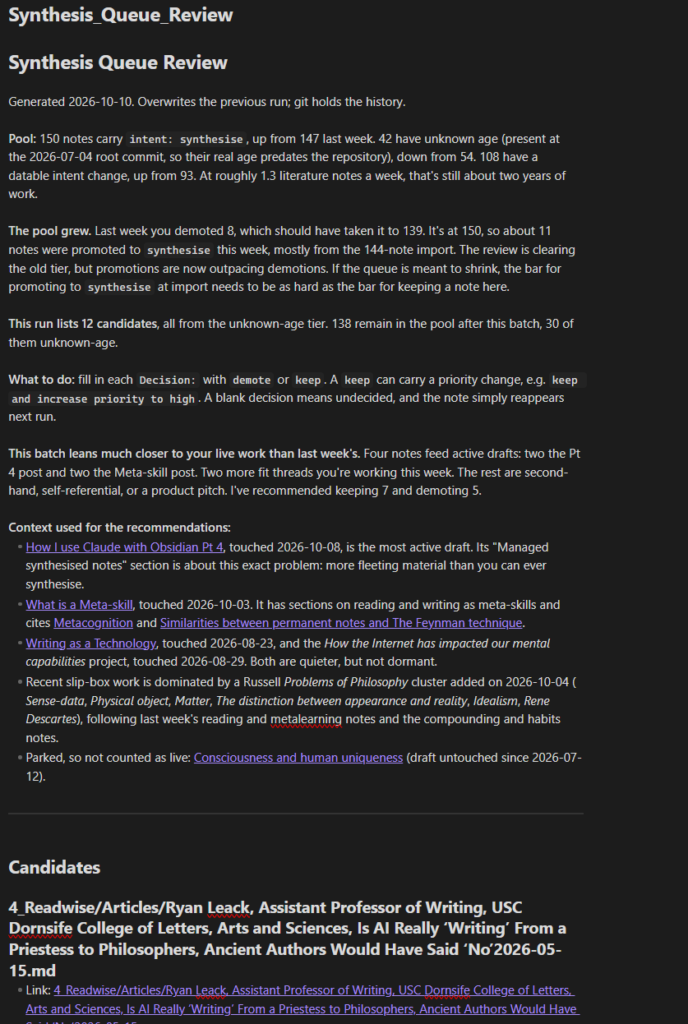
I brainstormed the issue with Claude, and it suggested adding an intent property to each note and only setting it to synthesise when I really wanted to add the note to my vault. Everything else could be kept in a library, available for future use if required.
Claude also suggested that I should adopt it manually as a test, which is what I did. The trial was a success, so we implemented it.
After a while, the notes marked for synthesis started building up, and again, with Claude’s help, I have introduced a weekly review. It’s a Claude skill that gets the AI to pick 12 of the oldest notes with an intent of synthesise and give its recommendation to keep or discard each one.
If I decide to keep a note, the date it was checked is added to it. If it’s discarded, the intent property is set to library.
The aim is to check any note that has had an intent of synthesise and has been in the queue for more than 3 months, with 12 of these being checked each week when I run the skill on a Saturday morning.
Obsidian Copilot changes
The Obsidian Copilot plugin has gone through a major redesign and can now connect with frontier AI agents such as Claude Code and Codex. I haven’t really used Copilot since I started using Claude. This is unlikely to change.
I have connected it to Claude Code and it seems to work well, though for some reason my suggest tags skill doesn’t appear to be available through its connection with Claude Code.
But I don’t really see a use case for it, as I can already use Claude Code and it has direct access to my notes. The only reason I can see for using it is to access an AI agent while remaining in the Obsidian app.
How do you use AI with Obsidian?
Why don’t you sign up to our monthly newsletter and keep up to date with our most recent content?
Further reading
- Claude Obsidian Workflow: My PKM Update (Part 3): The last post in this series
- Using Obsidian for my writing: A post about how I use Obsidian for writing
- Understanding Information Overload: A post in which I explore what information overload is